Introduction:
When designing for security and scalability in Google Cloud, Identity and Access Management (IAM) forms the backbone of how users, service accounts, and resources interact securely.
However, many new architects and developers find IAM confusing at first — how exactly is access granted?
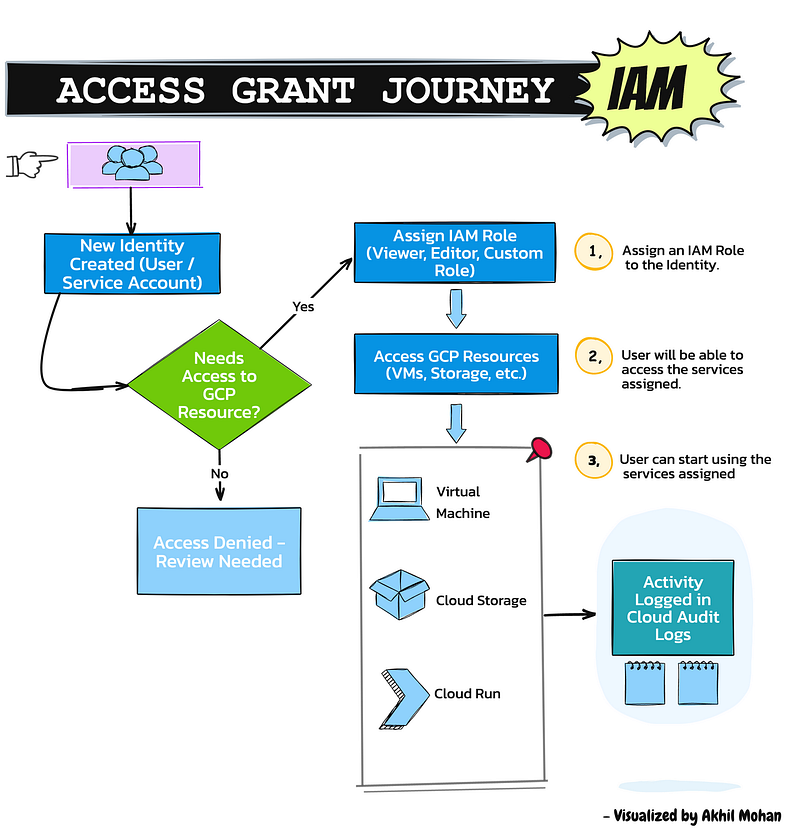
To simplify this journey, I visualized the typical Access Grant Journey in GCP IAM as a clear step-by-step flow. Let’s walk through it together.
Breaking Down the Journey:
Step 1: Identity Creation: Everything starts with the creation of an identity: either a User Account or a Service Account. This entity represents whoever (or whatever) needs to interact with GCP services.
Step 2: Needs Access to GCP Resource? Once the identity is created, the next decision is whether they require access to any GCP resources (like Compute Engine, Cloud Storage, BigQuery, etc.).
- If Yes → proceed to assign roles.
- If No → access is denied, and further review may be needed.
Step 3: Assign IAM Role: GCP IAM uses a role-based access control (RBAC) model.
An identity must be granted a Role, which defines a set of permissions. Examples include:
- Viewer (read-only access)
- Editor (read/write access)
- Custom Roles (tailored permissions)
Assigning the correct role ensures principle of least privilege is maintained.
Step 4: Access to GCP Resources: Once a role is assigned, the identity can access the assigned resources.
Examples:
- Launching and managing VM instances
- Storing/retrieving data from Cloud Storage buckets
- Deploying applications to Cloud Run
Step 5: Activities Logged for Audit: Every action performed by the identity is logged automatically in Cloud Audit Logs.
Audit logs are essential for:
- Security monitoring
- Compliance reporting
- Operational troubleshooting
They create a verifiable trail of who did what, when, and on which resource.
Real-World Example: Imagine a developer joining a GCP project:
- They create a user account.
- They request access to deploy a serverless app.
- The project owner grants them the Cloud Run Admin role.
- They deploy services to Cloud Run.
- Every deployment and change is logged automatically for auditing.
Simple — but secure and observable.
Conclusion:
Understanding how access is granted in Google Cloud through IAM is fundamental to building secure, scalable, and compliant architectures.
By following a clear flow — identity ➔ decision ➔ role ➔ resource ➔ audit — you can ensure that your cloud environment remains safe and manageable at any scale.