There’s a reason most companies start their AI journey with chatbots and not voice assistants.
Text is forgiving. A user sends a message, waits a few seconds, gets a response. If the AI takes three seconds to reply, nobody notices. If it takes five, maybe they glance at their phone. No big deal.
Voice doesn’t work that way.
On a phone call, silence is failure. Two seconds feels long. Three seconds feels broken. Five seconds? The caller has already hung up, convinced the system crashed.
This is the wall that most voice AI projects run into. They nail the demo — impressive responses, natural conversation flow, handles edge cases beautifully. Then they go to production and fall apart because nobody planned for the fact that real-time voice has completely different constraints than text.
So what does it actually take to build voice AI that works? DoorDash recently cracked this problem for their contact center, and the details are worth studying.
The Real Constraint Nobody Plans For
DoorDash handles hundreds of thousands of support calls every day. A huge chunk of those come from Dashers — their delivery drivers — who need help while they’re literally on the road.
Think about that context for a second. A Dasher is driving between deliveries, something goes wrong with the app or a payment, and they need an answer. They’re not going to pull over and type out a support message. They’re going to call. And every minute they spend on hold is a minute they’re not earning.
DoorDash already had a self-service IVR system running on Amazon Connect and Amazon Lex. You know the type — “press 1 for account issues, press 2 for payment questions.” It worked reasonably well. They’d cut agent transfers by 49% and saved around $3 million a year.
But most calls were still ending up with human agents. The IVR could handle simple routing, but anything beyond basic menu navigation required a person.
The obvious move was to add generative AI. Let callers speak naturally, have the AI understand their problem, give them an answer. Simple in theory.
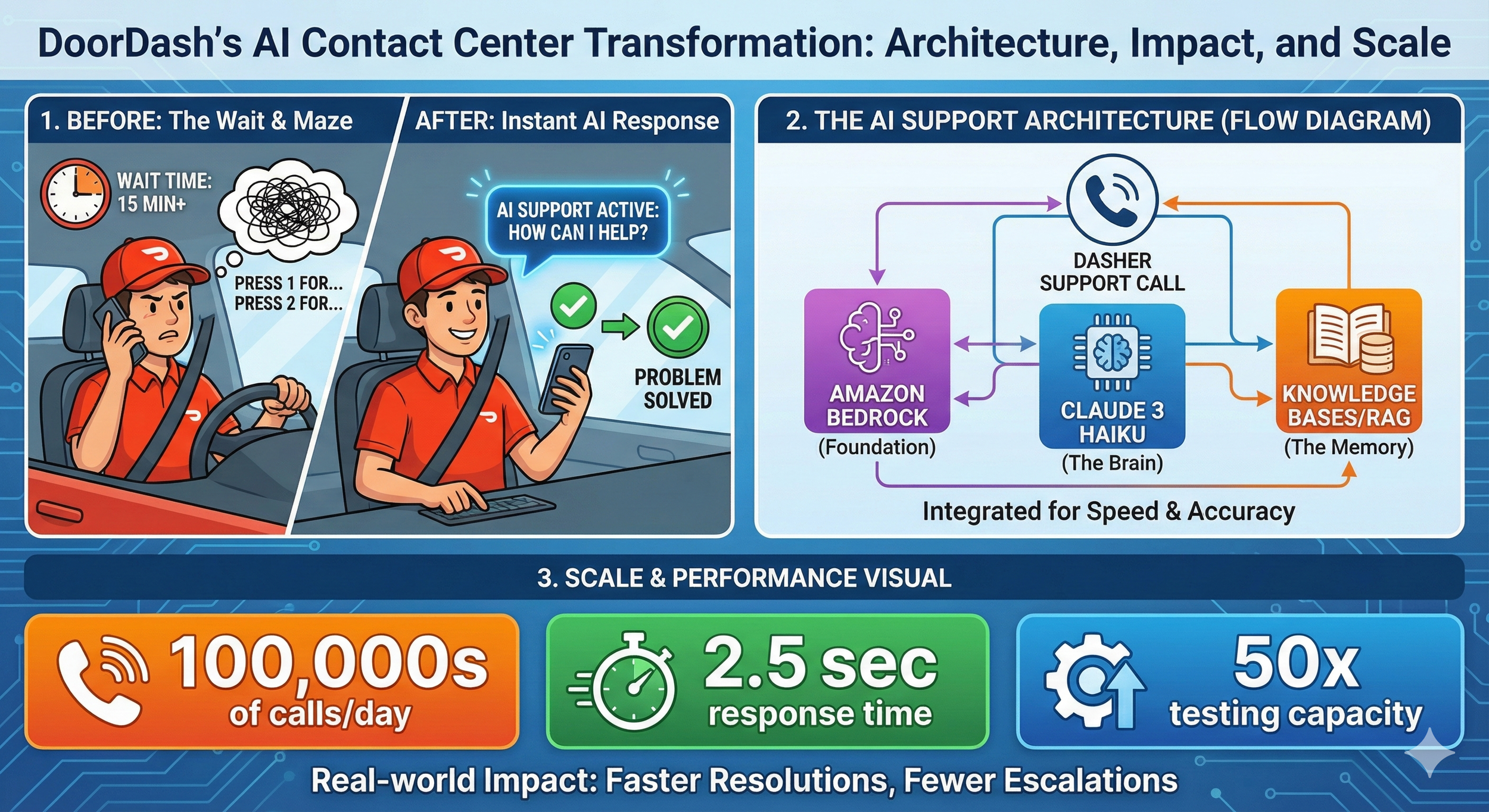
The constraint? Whatever solution they built had to respond fast enough that callers wouldn’t notice they were talking to a machine. That meant the entire pipeline — speech recognition, AI processing, knowledge retrieval, response generation, text-to-speech — had to complete in about two seconds.
That’s a very different engineering challenge than building a chatbot.
Why Model Selection Matters More Than You Think
When most teams evaluate AI models, they focus on capability. Can it understand complex queries? Does it handle nuance well? How’s the reasoning?
Those things matter. But for voice applications, latency is the filter that comes first. A brilliant response that takes four seconds is worse than a good response that takes two.
DoorDash landed on Anthropic’s Claude 3 Haiku, and they got their total response latency under 2.5 seconds.
To appreciate what that means, think about everything happening in those 2.5 seconds:
- The caller’s speech gets transcribed to text
- The system figures out what they’re actually asking
- It searches the knowledge base for relevant information
- Claude generates an appropriate response
- That response gets converted back to speech
Each step takes time. Each step can fail. And the whole thing needs to feel instantaneous to the caller.
Haiku was chosen specifically because it hits the right balance — fast enough for real-time voice, capable enough to handle the range of questions Dashers ask, and built with guardrails against hallucination and prompt injection. That last part matters a lot when you’re handling hundreds of thousands of calls daily. You really don’t want your AI confidently making things up or getting manipulated into saying something it shouldn’t.
For anyone evaluating models for voice: Start with latency requirements, then filter for capability. Not the other way around.
The Knowledge Problem
Here’s another place where voice AI projects stumble: they try to rely on the model’s built-in knowledge.
That works fine for general questions. But customer support isn’t general questions. It’s “how do I update my direct deposit?” and “why was my last delivery payment different?” — questions that require current, company-specific information.
If your AI hallucinates an answer to a general knowledge question, it’s embarrassing. If it hallucinates an answer about someone’s payment, it’s a serious problem.
DoorDash solved this with Retrieval-Augmented Generation (RAG) using Knowledge Bases for Amazon Bedrock.
The concept is straightforward: instead of asking Claude to answer from memory, you first search your own documentation for relevant information, then give that context to the model along with the question. Claude generates a response based on your actual help articles — not whatever it picked up during training.
Why RAG changes the game:
Your payment process changed last month? Update the help center article, and the AI immediately gives the correct answer. No retraining, no hoping the model figures it out.
You can also trace exactly which documents informed any response. When something goes wrong — and something always goes wrong — you can debug it.
DoorDash pointed Knowledge Bases at their existing help center content and let the managed service handle the ingestion, embedding, and retrieval. They didn’t have to build a custom vector database or write retrieval logic from scratch.
For anyone building support AI: RAG isn’t a nice-to-have. It’s table stakes. If you’re building customer-facing AI without it, you’re gambling with accuracy.
The Infrastructure That Makes Iteration Possible
Here’s something that separates successful AI deployments from the ones that launch and immediately catch fire: testing infrastructure.
Before this project, DoorDash tested their contact center changes by pulling actual support agents off the queue to manually call in and run through scenarios. It was expensive, slow, and couldn’t possibly cover the range of things real callers would say.
They built an automated testing framework using Amazon SageMaker that runs thousands of tests per hour — 50x more than their previous manual capacity. But the important part isn’t the volume. It’s that the framework semantically evaluates whether responses are correct, not just whether the system responded.
That’s a crucial distinction. “The AI said something” is a low bar. “The AI said the right thing” is what actually matters.
This kind of testing infrastructure lets you iterate fast. You can try prompt changes, swap knowledge sources, adjust retrieval parameters, and know within hours whether you made things better or worse. Without it, you’re flying blind.
For anyone building production AI: Budget time for evaluation frameworks. Not just unit tests — semantic evaluation against ground truth. Your AI will work perfectly in demos and fail on edge cases you never imagined. You need a way to catch that before your users do.
What Amazon Bedrock Actually Provides
I should explain why DoorDash went with Bedrock rather than building directly on model APIs.
For folks newer to this space: Bedrock is AWS’s managed service for accessing foundation models. Instead of figuring out how to host models, manage infrastructure, and handle scaling yourself, you get an API that handles all of that. Multiple models available through a single interface.
For practitioners: The real value is flexibility without lock-in. DoorDash could test different models, compare performance, and switch without rebuilding their architecture. They reported cutting development time by 50% compared to building custom integrations.
For architects: Bedrock handles security at the infrastructure level — encryption, data isolation, access controls. DoorDash noted that no personally identifiable information gets passed to the AI components; the architecture enforces that boundary. When you’re handling hundreds of thousands of calls with real customer data flowing through, that matters.
The managed knowledge base is also a big deal. RAG has a lot of moving parts — document ingestion, chunking, embedding, vector storage, retrieval, prompt augmentation. Bedrock handles all of it. DoorDash focused on their actual product instead of building RAG infrastructure from scratch.
The Results That Matter
DoorDash went from kickoff to live A/B testing in 8 weeks. The solution now handles hundreds of thousands of Dasher support calls daily.
The numbers that matter:
- Response latency under 2.5 seconds
- Thousands fewer escalations to human agents per day
- Fewer agent tasks required to resolve issues
- 50x increase in testing capacity
But here’s what I find more interesting: what they’re building next.
DoorDash mentioned they’re expanding the knowledge bases and integrating with their logistics workflow service. That means the AI won’t just answer questions — it’ll take actions.
Instead of “you can update your payment method in settings,” imagine hearing “I’ve updated your payment method to the new card you have on file. You’re all set.”
That’s a different product entirely. And it’s where all of this is heading.
Patterns Worth Stealing
If you’re building voice AI — or any production AI system — here’s what DoorDash’s approach teaches us:
Latency is a feature, not an optimization. For voice, it’s the primary constraint. Design for it from day one, not as an afterthought.
Model selection is architecture. The model you choose shapes what’s possible. For voice, start with latency requirements and filter from there.
RAG is mandatory for accuracy. If your AI needs to give current, company-specific information, retrieval-augmented generation isn’t optional. It’s how you ensure accuracy.
Testing infrastructure enables iteration. You can’t improve what you can’t measure. Semantic evaluation against ground truth is how you know if you’re actually getting better.
Managed services buy you time. A 50% reduction in development time is real. Sometimes the right move is paying for infrastructure so you can focus on your actual product.
Start with augmentation, not replacement. DoorDash didn’t try to eliminate human support. They handled the routine stuff with AI so humans could focus on complex problems. That’s a realistic path to value.
The Bigger Lesson
There’s a pattern in how companies successfully deploy generative AI: they pick high-volume, repetitive tasks where the cost of errors is manageable and the improvement potential is obvious.
Customer support is almost the perfect use case. Massive volume. Many questions are routine. The existing experience (hold music and phone trees) is so bad that even imperfect AI feels like an upgrade. And humans stay in the loop for anything complex.
DoorDash didn’t try to boil the ocean. They picked a specific user group (Dashers), a specific channel (voice), and a specific problem (routine support questions). They built something that works for that scope, proved it out, and now they’re expanding.
That’s not the most exciting AI story. Nobody’s writing breathless headlines about incremental contact center improvements. But it’s real. It’s working. It’s saving money and making users happier.
Sometimes the best AI strategy isn’t revolutionary. It’s finding the places where the technology is ready, the problem is clear, and the value is obvious — then executing well.
A different version of this blog is available here on CloudGirl Bytes Newsletter - https://www.thecloudgirl.dev/blog/how-doordash-built-a-voice-ai-contact-center-that-actually-works. Do subscribe to read this version.